Home
How to Create High Quality Naruto Edits Using Professional Tools and AI
Creating a compelling Naruto edit requires more than just cutting clips to music. In the modern landscape of anime music videos (AMVs) and short-form social media content, viewers expect high-fidelity visuals, frame-perfect synchronization, and unique stylistic choices. Whether you are aiming for the gritty "Know Pain" aesthetic or a narrative-driven fan-cut that removes filler, the tools and techniques available in 2026 have made professional-grade production accessible to everyone.
Selecting the Right Software for Your Naruto Editing Projects
The choice of software is the most critical decision an editor makes, as it dictates the ceiling of your creative possibilities. While many beginners start with basic mobile apps, the transition to professional suites allows for complex compositing and advanced visual effects that define the top tier of Naruto content.
After Effects
The primary choice for desktop editors. It offers deep integration with plugins like Deep Glow and Twixtor, which are essential for the smooth, high-contrast look seen in viral Naruto edits.
Alight Motion
Widely considered a top choice for mobile users. While it has a steeper learning curve than other apps, its keyframe easing and vector graphics support are exceptionally strong.
CapCut
An excellent starting point for those new to editing. It provides many built-in transitions and AI-assisted features that simplify the process of syncing clips to trending audio.
| Software | Best For | Key Feature | Learning Curve |
|---|---|---|---|
| After Effects | High-end VFX | Plugin Support (Deep Glow) | High |
| Alight Motion | Mobile Motion Graphics | Custom Easing Graphs | Medium-High |
| CapCut | Social Media Edits | Auto-Beat Sync | Low |
| Premiere Pro | Long-form Fan-Cuts | Efficient Timeline Management | Medium |
For those looking for a middle ground, platforms like Pippit offer template-based solutions that allow editors to drag and drop assets into pre-made structures. This is particularly useful for e-commerce or quick social media updates where speed is prioritized over custom frame-by-frame manipulation.
Sourcing High Quality Logoless Naruto Clips for Your Projects
The foundation of any great edit is the quality of the raw footage. Using clips with watermarks, subtitles, or low-resolution artifacts can significantly detract from the final product. Professional editors spend a significant amount of time sourcing "logoless" footage to ensure their effects and color grading look their best.
One of the most reliable sources for high-quality assets is Pixabay , which hosts over 343 free 4K and HD stock videos specifically tagged for Naruto edits. These assets often include clean shots of characters like Sasuke or the Nine-Tails, providing a perfect canvas for experimental color grading. Additionally, Pinterest serves as a massive repository for inspiration, with curated boards containing over 610 distinct editing ideas and aesthetic references.
Techniques for Mastering the Know Pain Visual Style
The "Know Pain" style, popularized by editors focusing on Pain (Nagato) and the Uchiha clan, is characterized by its dark, atmospheric, and high-contrast visual language. Achieving this look requires a specific stack of effects and a deep understanding of how light interacts with the anime art style.
The Visual Effect Stack
To replicate this aesthetic, you must focus on three core pillars: color grading, glow, and synchronization. The color grading usually involves crushing the blacks and boosting the saturation of specific colors (like the orange of Naruto's chakra or the red of the Sharingan). In After Effects, the "Deep Glow" plugin is frequently used to create a soft, ethereal light that bleeds from the characters' eyes or energy attacks.
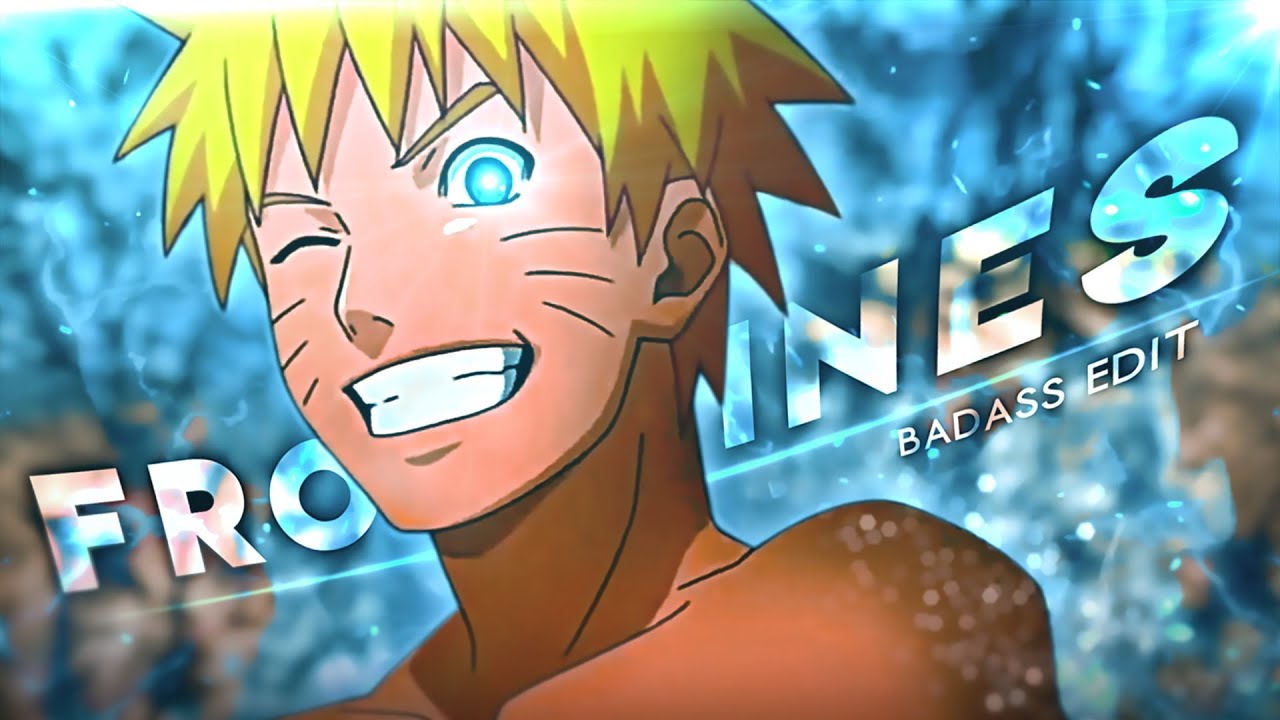
Image source: YouTube
Audio selection is equally important. The "Know Pain" style often utilizes slowed and reverbed tracks, such as those by artists like *slxughter*, to set a somber yet powerful mood. The editing must be "frame-perfect," meaning every major visual change or transition happens exactly on a beat or a snare hit. This creates a hypnotic rhythm that keeps the viewer engaged throughout the short duration of the edit.
Integrating AI Tools for Realistic Live Action Naruto Sequences
A significant advancement in the editing community is the use of AI to bridge the gap between 2D anime and realistic live-action visuals. Tools like Seedance 2.5 are now being used to generate realistic frames of characters like Itachi or Naruto, which can then be integrated into traditional editing workflows.
The hybrid workflow involves generating a series of AI images that maintain character consistency and then using tools like After Effects to animate them or composite them into real-world environments. According to recent community experiments, a viral-quality "live-action" sequence can be attempted with as few as 20 targeted AI generations, provided the editor has a strong grasp of lighting and shadow matching.
Creating Narrative Fan Cuts by Removing Filler and Padding
While AMVs focus on music and visuals, "Fan-Cuts" focus on storytelling. Projects like Naruto Resealed follow a philosophy similar to "One Pace," where the goal is to remove the excessive padding, repetitive flashbacks, and filler episodes that plague the original broadcast.
The Manga-Accurate Workflow
To create a successful fan-cut, editors often refer back to Masashi Kishimoto’s original manga. The process involves:
- Identifying Filler: Removing entire episodes or arcs that do not contribute to the primary canon storyline.
- De-padding Scenes: Cutting out the 5-second reaction shots of every character in the room, which are often used to stretch airtime in the anime.
- Re-ordering Sequences: Sometimes the anime changes the order of events; a fan-cut re-aligns these to match the manga's pacing.
- Audio Re-mastering: Since cutting scenes can break the background music, editors must often layer in the original soundtrack (OST) to ensure smooth transitions between the newly joined clips.
Optimizing Motion and Performance in Alight Motion
For mobile editors, Alight Motion stands out as a top-tier option, but it is notorious for causing device lag when projects become complex. Mastering the technical side of the app is just as important as the creative side.
Keyframe easing is the secret to professional motion. Instead of using linear movement, editors should use the easing graph to create "Fast-In, Slow-Out" transitions. This mimics natural physics and makes character movements feel more impactful. To manage performance, it is highly recommended to use the "Grouping" feature. By grouping layers that are already finished, the app has fewer individual elements to render in real-time, which significantly reduces lag on mid-range smartphones.
Navigating Copyright Guidelines for Anime Content Creators
One of the biggest hurdles for Naruto editors is the risk of copyright strikes. Platforms like YouTube and TikTok have automated systems that detect copyrighted audio and visuals. To minimize this risk, editors should understand the principles of "Fair Use," which protects content that is transformative in nature.
Adding significant effects, color grading, and creative transitions helps demonstrate that the work is a new creation rather than a simple re-upload of the original show. Furthermore, subtle manipulations of the audio—such as slightly changing the pitch or speed—can often help bypass automated Content ID systems. However, the most reliable way to avoid blocks is to keep individual clips short (under 5-7 seconds) and ensure the edit as a whole provides a new perspective or artistic value to the footage.
Archival Editing and Community Contributions on Naruto Wikis
Editing isn't limited to video. The Naruto fandom relies heavily on archival editors who maintain the Narutopedia and other databases. This form of editing involves documenting character abilities, plot points, and historical data with academic precision.
This side of the community often involves navigating complex politics, such as the ongoing debates regarding "canon-only" vs. "filler" documentation. For example, conflicts have historically arisen over how much detail to include for secondary characters like Ino Yamanaka, with some admins preferring to focus strictly on manga-canon events. Contributing to these wikis is a significant way to give back to the fandom, requiring a different but equally valuable set of editing skills: research, fact-checking, and collaborative writing.
Frequently Asked Questions
- Where can I download logoless Naruto clips for my edits?
- The most effective way to find logoless clips is through dedicated "scenepack" communities on Discord or by searching for royalty-free assets on sites like Pixabay. Many editors also use specialized software to remove subtitles from original Japanese broadcasts, though downloading pre-cleaned scenepacks is much faster for beginners.
- Is Alight Motion better than CapCut for Naruto edits?
- It depends on your goals. Alight Motion is widely considered a top choice for those who want manual control over keyframes and motion graphs, similar to professional desktop software. CapCut is a popular choice for editors who want to create high-quality content quickly using built-in effects and templates without a steep learning curve.
- How do I get the 4K glow effect on a mobile device?
- To achieve a 4K-style glow on mobile, you should layer your footage. Duplicate your main clip, apply a "Gaussian Blur" to the top layer, and change the blending mode to "Screen" or "Linear Dodge (Add)." Adjust the opacity until the highlights appear to glow naturally without washing out the entire image.
- What is a good character for a first Naruto edit?
- Characters with high-contrast visual elements are often the easiest to edit. Sasuke Uchiha (with his blue Chidori and red Sharingan) or Itachi are excellent choices because their color palettes respond very well to basic color grading and glow effects, making it easier for beginners to see immediate results.
- How can I prevent my Naruto edit from being blocked on YouTube?
- To avoid blocks, ensure your edit is highly transformative. Use short clips, add heavy visual effects, and consider using "slowed + reverb" versions of songs, which are less likely to trigger automated audio matching. Always include a disclaimer and credit the original creators in your description.
Key Takeaways for Naruto Editors
- Choose software based on your hardware: Use After Effects for professional desktop VFX or Alight Motion for advanced mobile motion graphics.
- Prioritize logoless 4K footage: Source clean clips from Pixabay or community scenepacks to ensure your color grading looks professional.
- Master the easing graph: Avoid linear movement; use custom curves in Alight Motion or After Effects to create natural, impactful character motion.
- Experiment with AI tools: Use Seedance 2.5 or similar AI for unique live-action frames and smoother slow-motion interpolation.
- Focus on narrative pacing: When creating fan-cuts, remove repetitive flashbacks and reaction shots to improve the story's flow.
- Protect your work: Use transformative effects and audio tweaks to navigate copyright systems on social media platforms.
- Contribute to the community: Beyond video, consider helping maintain the Naruto wikis by documenting canon facts and cleaning up archives.
Start your next project by selecting a high-contrast character scenepack and practicing your keyframe easing to achieve that professional flow.