Home
How to Find and Create High Quality Goku Edits for TikTok and YouTube
Creating high-quality Goku edits requires a mix of raw 4K footage , frame interpolation (Twixtor), and precise beat-syncing. Creators typically source clips from repositories like Vlipsy or Pinterest, then use software like CapCut (mobile) or After Effects (desktop) to apply speed ramps and color grading. The most popular styles currently focus on the Shintani aesthetic from Dragon Ball Super: Broly and high-contrast manga transitions.
Why Goku Edits Continue to Dominate Social Media Trends
Goku edits have evolved significantly since the early days of 2000s Anime Music Videos (AMVs). What once consisted of simple clips set to Linkin Park tracks has transformed into a highly technical art form. Today, short-form platforms like TikTok and YouTube Shorts have birthed a new era of "Vibe Edits," where the focus is on visual fluidity, complex transitions, and atmospheric soundscapes.
The appeal of Goku as a subject remains remarkably high due to his iconic transformations. Whether it is the primal intensity of Super Saiyan 3 or the divine serenity of Mastered Ultra Instinct (MUI), these sequences provide the perfect visual peaks for editors to sync with high-energy music. According to community discussions, these transformations are among the most sought-after moments for creators because they offer clear "drops" in the music where visual effects can be maximized.
Understanding the community is essential for any aspiring editor. The audience is split between casual consumers who enjoy the hype and dedicated creators who analyze every frame. Modern edits often lean into specific sub-genres, such as "Phonk edits" which utilize heavy bass and aggressive speed ramping, or "LoVibe edits" that focus on the softer, more nostalgic aesthetic of the original Dragon Ball run.
Where to Download High Quality Goku Clips for Edits
Finding the right raw material is the first step in creating a viral edit. Using footage with subtitles or watermarks can significantly lower the perceived quality of your work. Professional editors prioritize "raws"—episodes or movie clips that have been stripped of all text and UI elements.
Finding Raw Footage and Repositories
For those looking for quick access to battle sequences, Vlipsy hosts over 256 dedicated Goku clips that are ideal for memes or short transitions. If you are looking for more cinematic inspiration, Pinterest is a major hub for clip discovery , with thousands of users curating specific boards for Ultra Instinct and Super Saiyan Blue footage.
Manga Scans and the Black-and-White Aesthetic
Manga edits have seen a massive surge in popularity. These involve using high-contrast scans from the Dragon Ball Super manga, often adding motion to static panels. Creators source these from digital archives, focusing on panels with heavy "ink" work to create a gritty, high-impact look. The key to a successful manga edit is the use of grain and glow effects to make the black-and-white art feel alive.
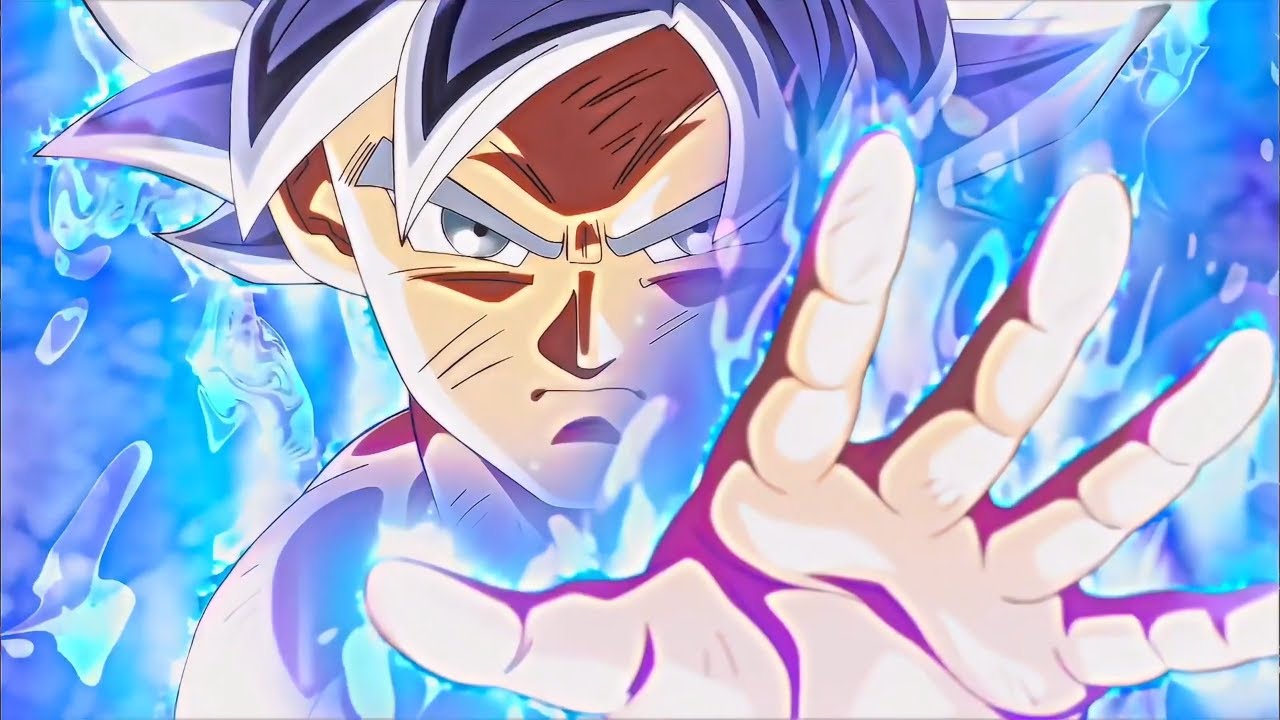
Image source: YouTube
Which Editing Software Should You Choose for Your Skill Level?
The choice of software depends heavily on your hardware and how much time you are willing to invest in learning the craft. While mobile apps have become incredibly powerful, desktop software still offers a level of control that is difficult to replicate on a touchscreen.
| Software | Platform | Skill Level | Core Strength |
|---|---|---|---|
| CapCut | Mobile/PC | Beginner | Ease of use & Auto-sync |
| Alight Motion | Mobile | Intermediate | Complex keyframing & Shakes |
| After Effects | Desktop | Professional | Twixtor & 3D Camera work |
CapCut: The Entry Point for Mobile Creators
CapCut has become a top choice for TikTok creators due to its massive library of pre-made templates and intuitive interface. It is particularly effective for "Solo All" style edits, where the focus is on quick cuts and basic transitions. While it lacks the deep plugin support of desktop apps, its "Optical Flow" feature provides a decent alternative for smooth slow motion.
After Effects: The Professional Standard
For those aiming to produce top-tier content, Adobe After Effects remains the industry standard. As discussed in various Reddit editing communities , After Effects allows for the use of Twixtor, a plugin that uses frame interpolation to create "liquid" slow motion that looks exceptionally smooth even at very low speeds.
How to Master the Twixtor Effect for Smooth Slow Motion
Twixtor is perhaps the most defining effect in modern anime editing. It works by calculating the motion between two existing frames and generating new "in-between" frames. This allows a 24fps anime clip to be slowed down to 10% speed without looking choppy.
- Prepare your clip: Ensure your raw footage is at least 1080p. Higher resolution helps the software track pixels more accurately, reducing "warping" artifacts.
- Apply Frame Interpolation: In After Effects, apply the Twixtor Pro effect. Set the input frame rate to match your clip (usually 23.976 or 24 fps).
- Speed Ramping: Instead of a constant slow speed, use keyframes to create a curve. Start fast, dip into a deep slow-motion Twixtor during a punch or Ki blast, and then accelerate back to normal speed.
- Masking Artifacts: If the Twixtor creates "warping" around Goku's hair or aura, use a simple mask to isolate the character or add motion blur to hide the imperfections.
Achieving the Shintani Aesthetic and Professional Color Grading
The "Shintani Look," named after animation director Naohiro Shintani, refers to the visual style used in Dragon Ball Super: Broly . It is characterized by softer line work, more fluid animation, and a color palette that feels both modern and nostalgic. Achieving this in an edit requires specific post-production techniques.
Color Grading for the Shintani Look
To replicate this aesthetic, editors should avoid the harsh, high-contrast shading typical of the Dragon Ball Z era. Instead, use a softer color grade with slightly desaturated shadows and warm, glowing highlights. In your editing software, try using "Linear Dodge" or "Screen" blend modes for Ki auras to give them a soft, ethereal glow rather than a solid, flat color.
Manga Style Transitions
If you are working with manga scans, the goal is high impact. Use "S_Shake" or similar camera shake effects during transitions. Adding a slight "Film Grain" overlay can help blend the static manga panels with animated clips, creating a cohesive visual experience that feels like a professional motion comic.
Using Power Scaling Data to Make Your Edits More Engaging
One of the most effective ways to increase viewer retention is to include "Power Scaling" statistics as text overlays. The "VS Battles" community is massive, and providing factual data points during a transformation sequence adds a layer of depth that simple visuals cannot achieve.
- Lifting Strength: According to calculations from Dragon Ball Super Episode 3, Goku is estimated to lift approximately 2,660 tons per weight while training on King Kai's planet. This data is widely cited in VS Battles community discussions .
- Training Duration: Goku mastered the basics of Ultra Instinct in roughly 40 years of total training time (including Room of Spirit and Time usage), a feat that typically takes Gods of Destruction millions of years.
By timing these text pop-ups to appear during a "beat drop" or a significant power-up moment, you provide the viewer with "information gain" that makes the edit more than just a montage—it becomes an educational experience for fans of the lore.
Choosing the Right Music for Your Goku Edit
Music is the heartbeat of any edit. While the "Phonk" genre—characterized by cowbell melodies and distorted bass—is currently a top choice for the algorithm, it is also polarizing. Some users find the "fart-bass" style distracting, while others believe it perfectly matches the intensity of a Saiyan battle.
If you want your edit to stand out, consider these alternative audio styles:
- LoVibe / Chillhop: Excellent for "slice of life" Goku edits or training montages.
- Bruce Faulconer Scores: Using the classic US broadcast soundtrack can trigger deep nostalgia for older fans.
- Orchestral Trap: A blend of cinematic strings and modern 808s that fits the "Godly" theme of Ultra Instinct.
"The best edits aren't just about the visuals; they are about how the visuals make you feel the music. If the sync is off by even a single frame, the magic is lost." — Common sentiment among the Reddit AMV community .
How to Export Your Edits Without Losing 4K Quality
There is nothing more frustrating than spending hours on an edit only for TikTok to compress it into a blurry mess. To maintain high quality, you must optimize your export settings specifically for social media platforms.
Recommended Export Settings
- Resolution: 1080x1920 (Vertical) is standard, but some creators prefer 1440x2560 for extra crispness.
- Frame Rate: Export at 30fps or 60fps. While anime is drawn at 24fps, using 60fps can make your Twixtor and transitions look much smoother on modern displays.
- Bitrate: For 1080p, aim for a bitrate between 15-20 Mbps. Going too high (e.g., 50 Mbps) will trigger the platform's aggressive compression, actually making your video look worse.
- Codec: Always use H.264 (MP4) for the best balance of quality and compatibility.
Frequently Asked Questions
Where can I get Goku clips for edits without watermarks?
The most reliable sources for clean clips are dedicated anime raw repositories. Sites like Vlipsy offer a curated selection of short clips, while Pinterest is excellent for finding specific aesthetics. For full episodes, many editors look for "NC" (No Credits) versions of openings and endings, or use Blu-ray rips which typically lack the TV station logos found in broadcast versions.
What is a top-rated app for Goku edits on iPhone?
For beginners, CapCut is widely considered a top choice due to its user-friendly interface and powerful built-in effects. However, if you want to perform more advanced keyframing and custom shakes, Alight Motion is a premier option for mobile users. It offers a layer-based system similar to professional desktop software, allowing for much greater creative freedom.
How do people make Goku edits look so smooth?
The "smooth" look is usually achieved through a combination of Twixtor (frame interpolation) and motion blur. By generating extra frames, editors can slow down footage without it becoming "choppy." Additionally, using "RSMB" (ReelSmart Motion Blur) in After Effects or the motion blur settings in CapCut helps blend the movement, making it look more natural to the human eye.
Is Phonk the only music used for Goku edits?
While Phonk is currently very popular on TikTok, it is by no means the only option. Many successful editors use heavy metal, orchestral scores, or even 90s hip-hop. The key is to match the music's energy to the visual style. For example, a "Shintani" style edit often pairs better with atmospheric or lo-fi tracks than aggressive Phonk.
What is a Shintani style edit?
A Shintani style edit mimics the art direction of the Dragon Ball Super: Broly movie. This style favors fluid, loose animation over the stiff, highly detailed shading of the 90s. Editors achieve this by using specific color grading (CC) that softens lines and uses a brighter, more vibrant color palette, often adding a slight "glow" to the entire frame.
How do I avoid copyright strikes on my Goku AMVs?
To stay within "Fair Use" guidelines, your work should be transformative. This means you shouldn't just upload a full scene from the show. By adding significant editing, color grading, music, and transitions, you are creating something new. Additionally, keeping clips short and providing commentary or educational value (like power scaling stats) helps protect your content.
Key Takeaways for Creators
Mastering the art of the Goku edit is a journey of technical refinement and creative expression. Here are the essential points to remember:
- ● Source High Quality Raws: Always use 1080p or 4K footage without subtitles for a professional look.
- ● Master Speed Ramping: Use curves rather than static speed changes to create dynamic, high-energy sequences.
- ● Leverage Twixtor: Use frame interpolation to achieve that signature "liquid" slow-motion effect.
- ● Apply the Shintani Aesthetic: Focus on softer lines and vibrant, glowing color grades for a modern feel.
- ● Include Data Overlays: Use power-scaling stats to engage the "VS Battles" community and increase retention.
- ● Optimize Export Settings: Use H.264 at a moderate bitrate to ensure your quality stays high on social media.
Start by downloading a few high-quality raw clips today and experimenting with a simple speed ramp to see how it changes the energy of the scene.